ProjectsVibe-Check
Interface Design
Visualizing the vibe-check dashboard and CLI output concepts.
Interface Design & Visuals
vibe-check follows the ItamiForge High-Aesthetic Standard: deep purples, functional glassmorphism, and high-density technical data.
1. Branding & Identity
The logo represents a scanning beam passing through a glass code block, signifying the tool's deep-inspection capabilities.
2. High-Fidelity Dashboard Concept
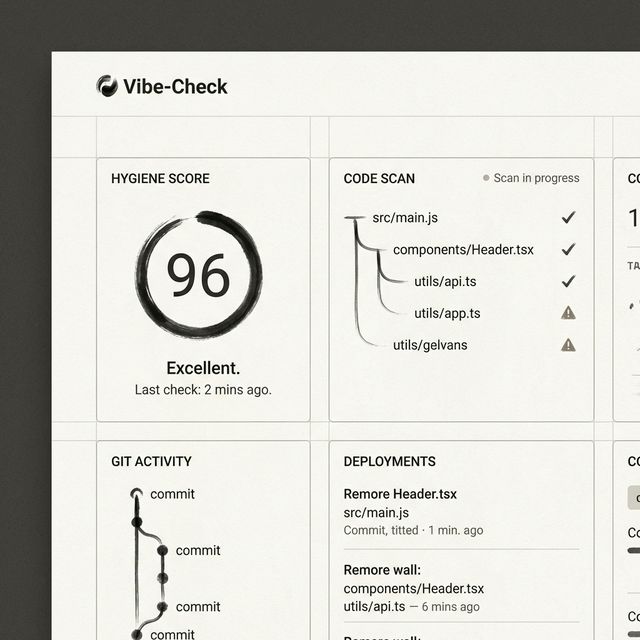
The web dashboard is organized into a Bento Grid for maximum scannability.
Widget Design Rationale
- Hygiene Score: A primary KPI showing overall codebase health.
- Directory Heatmap: Visualizes "Slop Hotspots" across the repo. Red zones indicate high "Model Fingerprint" density.
- Slop Log: Real-time list of conversational fragments and stale patterns found in the last scan.
- Vibe Trend: Tracks if the codebase is getting "cleaner" or "sloppier" over the development lifecycle.
3. TUI / Developer Flow
In the terminal, vibe-check uses ratatui to provide a similar rich experience:
graph LR
    Scan[Running Scan...] --> Summary[Scan Summary]
    Summary --> Details[Detailed Issue View]
    Details --> Fix[Apply Automated Fixes]
    Details --> Ignore[Flag as False Positive]
Key TUI Features:
- Scan Glitch FX: Subtle visual feedback during scanning.
- Keyboard Shortcuts: One-key "Nuke Slop" functionality.
- Diff View: Instant preview of suggested comment/code cleanups.